IBM Cloud Pak for Data - Monitoring alerts and events
OVERVIEW
IBM Cloud Pak® for Data provides as monitoring and alerting framework that you can use to monitor the state of the platform and set up events to alert when action is needed, based on the defined thresholds.
FEATURES DESIGNED
-
Monitor and manage events and alerts
-
Alerting rules and configurations.
-
Event chart - visualization, bubble chart
-
Pause, restart an alert.
ROLE
Product designer - Interaction, Visual design, Prototyping & Testing
Jan 2024 - Ongoing
TIMELINE
Added design features for improving the existing Alerting mechanism in Cloud Pak for Data for better monitoring capabilities. Designed the Alerting rule configuration feature which was only available in JSON format in the APIs.
In this process, I lead the designs as an Interaction designer and worked along side of Content strategists, Product manager, Senior designer and UI Developers. This project was started in Jan 2023 and I am still supporting it for any updates.
The design process comprised of IBM Design Thinking activities such as creating User flow. I also collaborated with the stakeholders wire-framing sessions to better align with everyone’s understanding with the requirements.
I updated designs and released a new version after each feedback cycle with users. I also did usability testing to understand user’s problem areas and what benefits them from the new designs.
Dashboard in Cloud Pak for Data. Introduced a launch tile for invocation of Alerts and Events
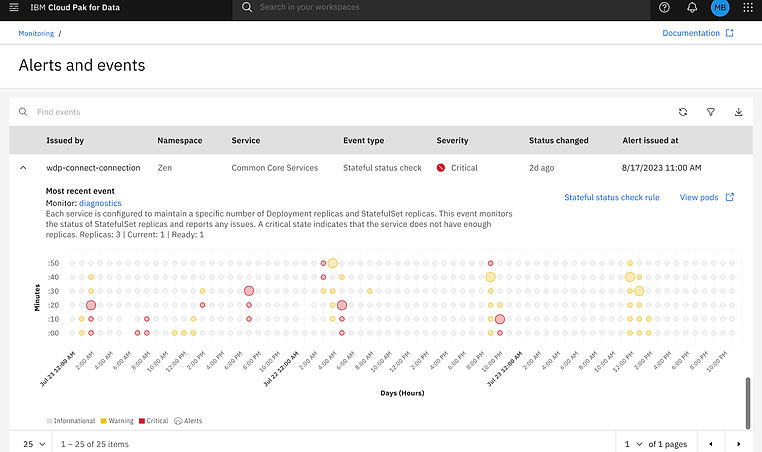

Chart interactions showing hover states for warning and critical Alerts
.png)
.png)
.png)
.png)


Alert configurations
CPD administrator can setup configurations that are rules to generate alerts for the user. The alerts can then be setup via user's Email, text or Slack (out of scope)
Key screen to show all high level hover interactions on this screen. Some actions user can take here are:
Create a new rule
Edit and Delete rule
View all available Default and Event type rules


Problem
Unavailability of UI for the administrators to configure Alert rules, which the made them do the changes in the API level.
.png)
Task flow
Task flow for the user and to understand the terminology and incorporate in it UI in an efficient way.
.png)
Wireframes
.png)
.png)
Scoping out details of each requirement and understanding key interactions on the landing page for alert configurations and for creating and editing rules
.png)
.png)
Wireframes
Deliverables and next steps
More stake holder reviews. So far, I have developed high-quality, responsive designs for Alerts and events UI, and have also completed dashboard updates that include the launch tile for Alerts and events. Additionally, I have added Bubble chart visualization and interactions to the chart, and introduced Alert configuration designs. Using Figma, I have created an interactive prototype for stakeholder review.
Moving forward, I am working on creating keyboard annotations as an accessibility guide for this project, and will continue to support Development and QA for implementation.
Scoping out details of each requirement and understanding key interactions on the landing page for alert configurations and for creating and editing rules
